Spec-Driven Development: Ship Features with AI Guardrails
Something has fundamentally shifted in how we build software. A year ago, if you told us we'd ship a production web application, 8 major features, 11 releases, 17,000 lines of TypeScript across a full

Something has fundamentally shifted in how we build software.
A year ago, if you told us we'd ship a production web application, 8 major features, 11 releases, 17,000 lines of TypeScript across a full-stack React + Express codebase with AI writing virtually all the code, we'd have smiled politely and moved on. But that's exactly what happened. And the interesting part isn't the AI. It's what we put around the AI.
The old way is gone (and that's okay)
Let's be honest: writing every line of code by hand is no longer the most productive way to build software. AI coding assistants have gotten remarkably good. They can scaffold components, implement API endpoints, refactor patterns across files, and even reason about architecture. We've reached a point where the bottleneck isn't typing code, it's knowing what to type.
And that's where most AI-assisted development goes sideways.
Hand an LLM a vague prompt like "build me a dashboard," and you'll get something. It might even look impressive for five minutes. But it won't match your design system. It won't follow your project's conventions. It won't handle the edge cases your users will inevitably find. And good luck maintaining it three months later when nobody (including the AI) remembers why certain decisions were made.
We needed a better approach. We needed to trust the AI, but with guardrails.
Enter spec-driven development
The idea is simple: don't start with code. Start with a specification.
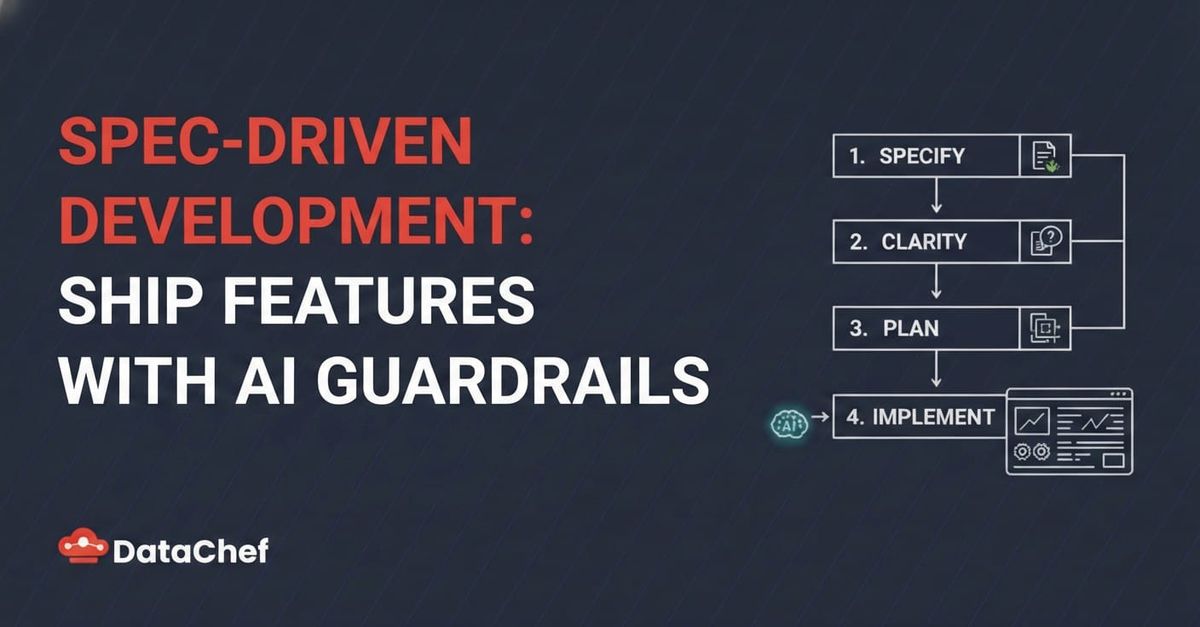
Before a single line of code gets written, every feature goes through a structured pipeline:
- Specify: Describe what you want in plain language. The system generates a formal specification with user stories, functional requirements, success criteria, and acceptance scenarios.
- Clarify: The spec gets challenged. Are the requirements testable? Are there ambiguities? Edge cases? Up to 5 targeted questions are asked and the answers get encoded back into the spec.
- Plan: Technical architecture gets designed. Research is conducted on the best patterns for each problem. Data models, API contracts, and integration scenarios are documented. Every decision gets a rationale and alternatives considered.
- Tasks: The plan gets broken down into a precise, dependency-ordered task list. Each task has an ID, exact file paths, parallel execution markers, and belongs to a specific user story. Sequential vs. parallel execution is explicitly defined.
- Implement: Tasks are executed phase by phase, respecting dependencies. Parallel tasks run simultaneously. Each completed task gets checked off. TypeScript compilation and tests are verified at the end.
This is what spec-kit does. It's an open-source specification framework that turns natural language into structured, validated, implementation-ready specifications, designed specifically for AI-assisted development. We adopted it at DataChef for one of our projects, and the results surprised us.
What this looks like in practice
Here's a real example from our project. We needed to replace pagination with infinite scrolling across 5 different table views. Instead of diving into code, we started with:
"Remove the paginations and load all data in every table, but keep the scroll inside the table, not for the whole page."
That single sentence went through the spec-kit pipeline and produced:
A specification with 2 user stories, 8 functional requirements, and 6 success criteria A research document with 5 technical decisions (CSS strategies for sticky headers, flex layout patterns, data volume analysis) API contracts documenting exactly how 4 endpoints would change A task list of 14 tasks across 3 phases, with explicit parallel execution groups A quickstart checklist with 30+ manual verification items
The AI then executed all 14 tasks (removing pagination from shared types, simplifying React Query hooks, updating 5 page components with sticky headers and scroll containers) and produced zero TypeScript errors and zero test failures.
The whole feature, from English sentence to working code, followed a traceable path where every decision was documented.
Why guardrails matter more than prompts
Here's what we learned after shipping 8 features this way:
Specifications are the real prompt engineering. A well-structured spec with clear acceptance criteria gives AI everything it needs to generate correct code. We stopped tweaking prompts and started improving specifications.
Research prevents costly mistakes. For one feature, the research phase discovered that our data volumes (under 200 records per table) didn't justify the complexity of incremental loading. That decision (documented with rationale) saved us from over-engineering. Without the research step, the AI would have happily built an unnecessarily complex infinite scroll system.
Parallel task execution is a superpower. Because spec-kit identifies which tasks touch different files, multiple AI agents can work simultaneously. In one phase, 5 agents updated 5 different page components in parallel. What would have been sequential 20-minute work completed in under 3 minutes.
The spec is the documentation. Every feature has a specs/ directory with its specification, plan, research decisions, API contracts, and task history. Three months from now, when someone asks "why does the dashboard scroll differently from the tables?", the answer is in specs/008-table-infinite-scroll/research.md, decision R-002.
The numbers
Across our project, spec-driven development with AI produced:
| Metric | Count |
|---|---|
| Features shipped | 8 |
| Production releases | 11 |
| Completed tasks | 190 |
| Spec artifacts generated | 60 |
| Application source code | 17,000 lines |
| Languages/frameworks | TypeScript, React 19, Express 5, TailwindCSS 4 |
Every one of those 190 tasks was derived from a specification, planned with documented rationale, and executed with explicit dependencies. Not a single feature started with "just write the code."
Trust, but verify
We're not saying AI writes perfect code. It doesn't. During this project we caught edge cases, fixed styling inconsistencies, and debugged issues that the AI missed. But the spec-driven approach changed when we caught those problems.
Instead of discovering architectural mistakes after 500 lines of code, the specification and planning phases surface them before any code exists. Instead of untangling spaghetti from a freeform AI session, every change maps to a task that maps to a user story that maps to a requirement.
The AI is the engine. The specification is the steering wheel.
What's next
Spec-kit is open source and designed to work with any AI coding assistant, Claude Code, Cursor, Copilot, or whatever comes next. We'll keep using it and sharing what we learn along the way.
If you're building software with AI and finding that the output is unpredictable, hard to maintain, or doesn't match what you actually needed, the problem probably isn't the AI. It's the input.
Give the AI a specification, not a wish.
Other tools in this space
Spec-driven development is picking up momentum. If you're exploring the approach, here are the tools worth looking at:
- spec-kit: The one we used. GitHub's open-source toolkit that provides templates, a CLI, and prompts to move work through specify → plan → tasks → implement. Agent-agnostic, works with Claude Code, Copilot, Gemini, and others.
- Kiro: An AI IDE by AWS (VS Code fork) with spec-driven development built in. You describe requirements in natural language, Kiro generates user stories, technical design docs, and implementation tasks. Great for teams that want the workflow embedded in the editor itself.
- Tessl: An agent enablement platform with a CLI that doubles as an MCP server. Its registry indexes 1,000+ reusable skills and docs for 10,000+ packages, keeping agent context version-matched to your dependencies. Focuses on making coding agents more effective through structured, versioned context.
- OpenSpec: A lightweight, fluid alternative that works with 20+ AI assistants. Uses an action-based workflow (proposal → specs → design → tasks → implement) with no rigid phase gates, you can update any artifact at any time.
The tooling is still young, but the pattern is clear: the teams that give AI structured input will ship faster and more reliably than those prompting from scratch.