Copilot VS. Custom LLM: Navigating the Generative BI Landscape
For years, Business Intelligence has followed a familiar, often frustrating pattern. An executive has a question, an analyst hunts for the answer, engineers build data pipelines, and eventually—days or weeks later—a dashboard appears. By the time the...

For years, Business Intelligence has followed a familiar, often frustrating pattern. An executive has a question, an analyst hunts for the answer, engineers build data pipelines, and eventually—days or weeks later—a dashboard appears. By the time the insights arrive, the decision window has often closed.
We are now entering a new stage of analytics. We are shifting away from static dashboards and moving toward conversational intelligence: unlocking an organization's institutional memory through natural language.
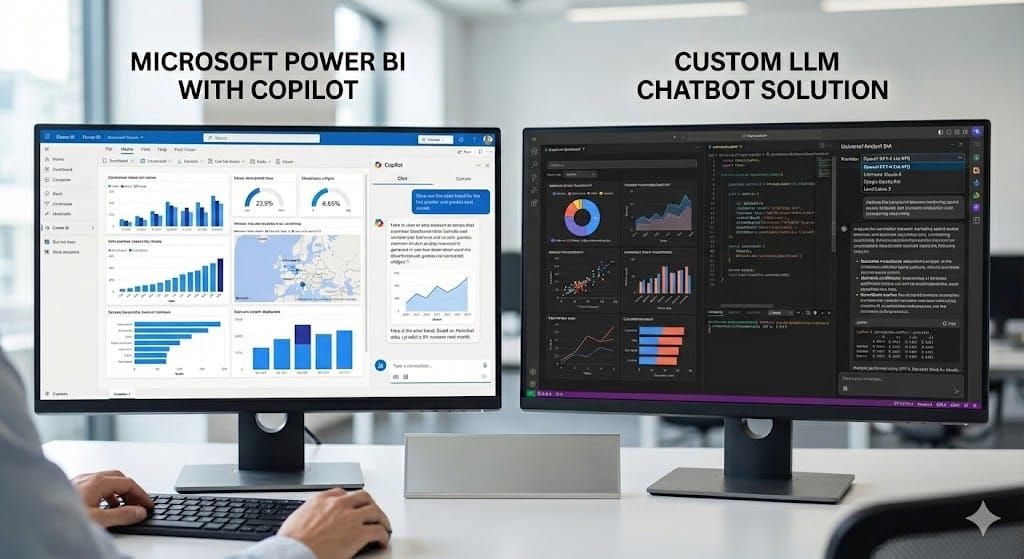
The question is no longer if you should adopt Generative BI, but how. Do you lean into the Microsoft ecosystem with Copilot, or does your context justify a custom architecture running on your own terms?
Copilot vs Custom: Quick Comparison
| Dimension | Copilot in Power BI | Custom Open-Source Stack |
| Time to value | Fast if you already run on Fabric/Premium | Medium; depends on infra readiness and team |
| Governance | Native Entra ID, RLS/OLS, Purview lineage | Can align with existing infra, IAM, and compliance needs; governance, logging, and lineage must be designed |
| Cost model | Fixed capacity + licenses | Variable; infra + pay-per-inference |
| Model choice | Microsoft-supported models | Bring-your-own; swap models freely |
| Data access | Optimized for Power BI semantic models | Direct-to-warehouse and docs via RAG/agents |
| Residency & privacy | Cloud with tenant and regional controls | Private VPC or on‑prem, air‑gapped possible |
| Flexibility | Tight Microsoft ecosystem integration | High; full control of components and routing |
| Operations | Managed; lower operational cost | Here operational cost is higher because you manage everything yourself. |
Note: A custom open-source stack typically combines components like LangChain/LlamaIndex for orchestration, open-source models (Llama/Mistral), a vector store (Elasticsearch/pgvector/Pinecone), and your existing warehouse/lake, all deployed within your current infrastructure (e.g., Kubernetes, VPC, existing IAM).
The Promise: Power BI with Copilot
Microsoft has integrated Copilot into Power BI, and for many organizations this is the most direct path into Generative BI. The vision is to remove technical barriers, allowing decision-makers to access data as easily as sending a message.
Imagine a sales director who needs to prepare for a quarterly review. Instead of filtering through slicers on a complex report, they type:
“Show me sales performance for Q3 compared with Q2. Break it down by region and point out the three weakest products.”
Copilot prepares a visual and a short explanation of why performance changed.
They follow up with:
"Why did our gross margin drop in October?"
Copilot scans the dataset and explains:
Gross margin fell by four percent because supply chain costs for Product Line X rose by fifteen percent.
This is the promise: simple questions, instant answers, automatic visuals. No need to open a ticket or wait for the next sprint.
Where Copilot Shines
It is important to be clear where Microsoft has built a real advantage. If your data strategy is centered on Azure, Copilot offers benefits that are hard to match with a purely custom stack:
- Seamless integration: It lives where your users already work: inside Power BI, Teams, and Excel. That matters for adoption.
- Identity & Governance: It leverages Entra ID (formerly Azure AD) for robust Role-Based Access Control (RBAC). If a user is restricted by row-level security, Copilot will not see that data either. You get consistent access rules from reports down into conversational queries.
- Auditability: With Microsoft Purview integration, you get built-in lineage, cataloging, and sensitivity labeling. This goes beyond just security. Analysts can trace where an answer came from, compliance teams can reason about risk, and executives can trust that numbers are not appearing from nowhere.
The Decision Matrix: Choosing Your Path
While Copilot is powerful, it is not a universal answer. Implementing Generative BI via the standard Microsoft route comes with specific infrastructure requirements and constraints that may not fit every agile or cost-conscious business.
Here is a framework to help you decide which approach fits your organization.
When Copilot + Power BI is the Right Answer
Staying with the official Microsoft platform is often the best choice if:
- You are a "Microsoft Shop": Your organization already uses Entra ID, Purview, and Power BI Premium or Fabric capacity. Your BI teams are comfortable with Power BI as the main semantic layer.
- You have solid semantic models: You have well-maintained semantic models. Copilot relies heavily on the quality of the underlying semantic layer; it struggles with messy or unstructured data.
- Governance and auditability are top priorities: You want audit logs, sensitivity labels, and lineage in a form that security and compliance already understand. You would rather inherit this from Entra + Purview than rebuild it.
- You accept the Fabric/Premium commitment: You are willing to pay the "Fabric Tax" (committing to Fabric or Premium capacities) for the ease of a fully managed service.
When a Custom Open-Source Solution Makes Sense
A custom Generative BI layer, built with open-source components and your own warehouse, becomes compelling when:
- You have strict data-residency or “offline” needs: In industries like defense, healthcare, or finance, sending data to a public cloud-hosted LLMs is not acceptable. You may need to run open-source models like Llama 3 or Mistral on-premise or in a private VPC where data never leaves your control.
- You care deeply about cost control and routing: Capacity-based billing for Fabric means you pay whether Copilot runs one query or one million. With a custom solution, you have control over model routing, allowing you to leverage low-cost models for most use cases and reserve more expensive reasoning models for complex tasks.
- Your “truth” lives in the warehouse, not only in Power BI: You want your conversational interface to talk directly to gold tables in Databricks, Snowflake, or other warehouses, and to combine that with unstructured documents via RAG and agents. Copilot is optimized for Power BI semantic models; a custom agent can be designed around your broader data estate.
- You want vendor flexibility: You want the freedom to swap the "brain" of your operation without changing your entire platform. If a new, faster model is released tomorrow, you want to plug it in immediately without waiting for a vendor update.
The Friction: Why Copilot Isn’t for Everyone
While Copilot’s capabilities are undeniably impressive, adopting it via the standard route often comes with substantial prerequisites and constraints — a reality that can be a barrier for agile or cost-sensitive organizations.
- “Capacity” costs required: To enable Copilot in Power BI (or the larger Microsoft Fabric ecosystem), your workspace must be hosted on a paid capacity — either Fabric capacity (F-SKU) or Power BI Premium capacity (P1 or higher). It’s not sufficient to only have a free or trial license. Microsoft Learn
- Fixed overhead, even if usage is low: Because capacity-based billing applies regardless of actual usage, you may incur infrastructure costs even if few Copilot queries are made. This can be a heavy commitment — especially for organizations with sporadic or unpredictable usage.
- Ecosystem lock-in: Copilot is deeply tied to Microsoft infrastructure, APIs, and model choices. That is a benefit if you are all‑in on the stack. It is a constraint if you want to experiment with open-source models, alternative warehouses, or a multi‑cloud architecture.
- Compliance & data-residency restrictions: For industries with strict regulatory requirements (finance, healthcare, etc.), using Copilot via cloud-based LLMs can raise concerns about data residency, governance, and compliance. While there are regional and tenant-level settings in Fabric, they require careful configuration. Microsoft Learn
The DataChef Approach: Co-Designing Your Architecture
At DataChef, we do not sell a boxed “GenBI product” that competes with Microsoft. We help you design and implement the architecture that fits your constraints, which often includes Copilot.
For some clients, that means tightening their Power BI models, access rules, and Purview setup so Copilot can actually be trusted. For others, it means designing a custom “institutional memory” engine that runs in their own environment, side‑by‑side with existing BI.
Here are a few patterns we tend to design for:
1. Specialized Security & "Air-Gapped" Intelligence
When zero data leakage is non-negotiable:
- Deploy open-source models fully within your private cloud or on‑prem environment.
- Fine‑tune models on your own jargon and metrics definitions so answers reflect how your organization speaks and reasons.
- Keep all prompts, logs, and embeddings inside your own perimeter.
2. Flexible Intelligence Through Model Routing
When cost and performance both matter:
- Route simple, high‑volume queries to small, local models.
- Reserve top‑tier hosted models (e.g. Claude, GPT‑4 class) for complex reasoning, planning, or edge cases.
- Evaluate and swap models as the landscape evolves, without changing your front‑end experience.
3. Governance by Design
When governance must span both Copilot and custom stacks:
- Integrate agents with your existing identity and access management (for example Entra or other IAM), so the same rules apply everywhere.
- Log questions, answers, and underlying queries in your environment so you can:
- See what people are actually asking.
- Identify gaps in your semantic models or warehouse.
- Improve definitions and data products over time.
Conclusion: Partnering for the Future
The shift to conversational BI is underway. The exact tool you use (Copilot, a custom agent, or both) matters less than whether you have:
- A clear view of your current BI and data platform.
- An honest assessment of your governance and residency constraints.
- A cost model that fits how you actually plan to use Generative BI.
For many Microsoft‑centric organizations, the right move is to start with Copilot in Power BI, provided the semantic models and governance are in good shape. As soon as you hit residency, multi‑cloud, or advanced routing needs, it becomes worth designing a custom Generative BI lane alongside it.
How we help If you are wrestling with this choice, a good first step is to take one or two concrete use cases - rather than your entire BI estate - and ask:
- Can Copilot, on top of our current models and governance, serve this well?
- Where do residency, cost, or multi‑platform needs push us beyond what Copilot can reasonably cover?
This is the kind of work we do with clients: we map your current BI setup, security requirements, and cost constraints, then co‑design the smallest viable next step - whether that is getting more value out of Copilot, adding a focused custom GenBI slice, or combining both into a coherent architecture.